For custom cabinet shops

The operating system for a cabinet shop.

From the first estimate to the signed contract, the bank feed and the sales-tax return — one app, built inside a working cabinet shop in South Florida, not in a software office.

A company starts with 30 days of Pro, free. No card needed to sign up.

VANBERT OSAI partner

How much do we pay a month for garbage?

Understanding the question…

Why run eight tools?

What a shop usually pays for and retypes between, and what the same job looks like here.

  • EstimatesToday: A spreadsheet and a calculatorComponents and price lists; AI extraction from plans
  • ContractsToday: A Word file and a separate e-signature subscriptionYour Google Docs templates, signed from your Gmail
  • InvoicesToday: Accounting software, retyped from the estimateGenerated from the billing schedule; change orders flow in
  • BookkeepingToday: Weekend data entryBank feeds and rules; reports ready any day
  • Supplier billsToday: An inbox, paper, a shoeboxRead by AI, matched to the bank payments
  • Sales taxToday: The accountant's spreadsheet at month endDR-15 prep that counts the vendor tax you paid
  • Client updatesToday: Calls and textsA portal: progress, documents, signatures
  • Dealer ordersToday: Email threadsMarketplace ordering from your catalog

What that costs today

Three tools a shop usually pays for, one person each, at public list prices — against the Pro plan. Open the list below to tick what you really pay for.

Today, 3 tools
$254 / month
Vanbert OS Pro
$149 / month
You keep
$105 / month$1,260 a year
Change what is counted — tools, people, amounts
  • DocuSign Standard

    Contracts signed from your own Gmail, no envelope limits

    Price/ user / month
    People
    Per month$30
  • Houzz Pro or similar

    Projects, estimates, invoices and the client portal

    Price/ month for the first person/ extra
    People
    Per month$199
  • Dext or similar

    Bills read from your inbox and matched to bank payments

    Price/ month, up to 5 people
    People
    Per month$25
  • QuickBooks Online Essentials

    Bank feeds, rules and reports

    Price/ month, up to 3 people
    People
    Per month—

    Keep it if your accountant works in it. Vanbert OS replaces the bank feeds, the categorizing and the reports — not payroll or the year-end return.

List prices as of October 2026, standard plans billed annually. Your saving depends on what you pay today — the numbers on the right only count what you ticked.

Everything the shop runs on

Each of these is in the app today, used daily by the shop that built it. The screens below are the real app with sample data.

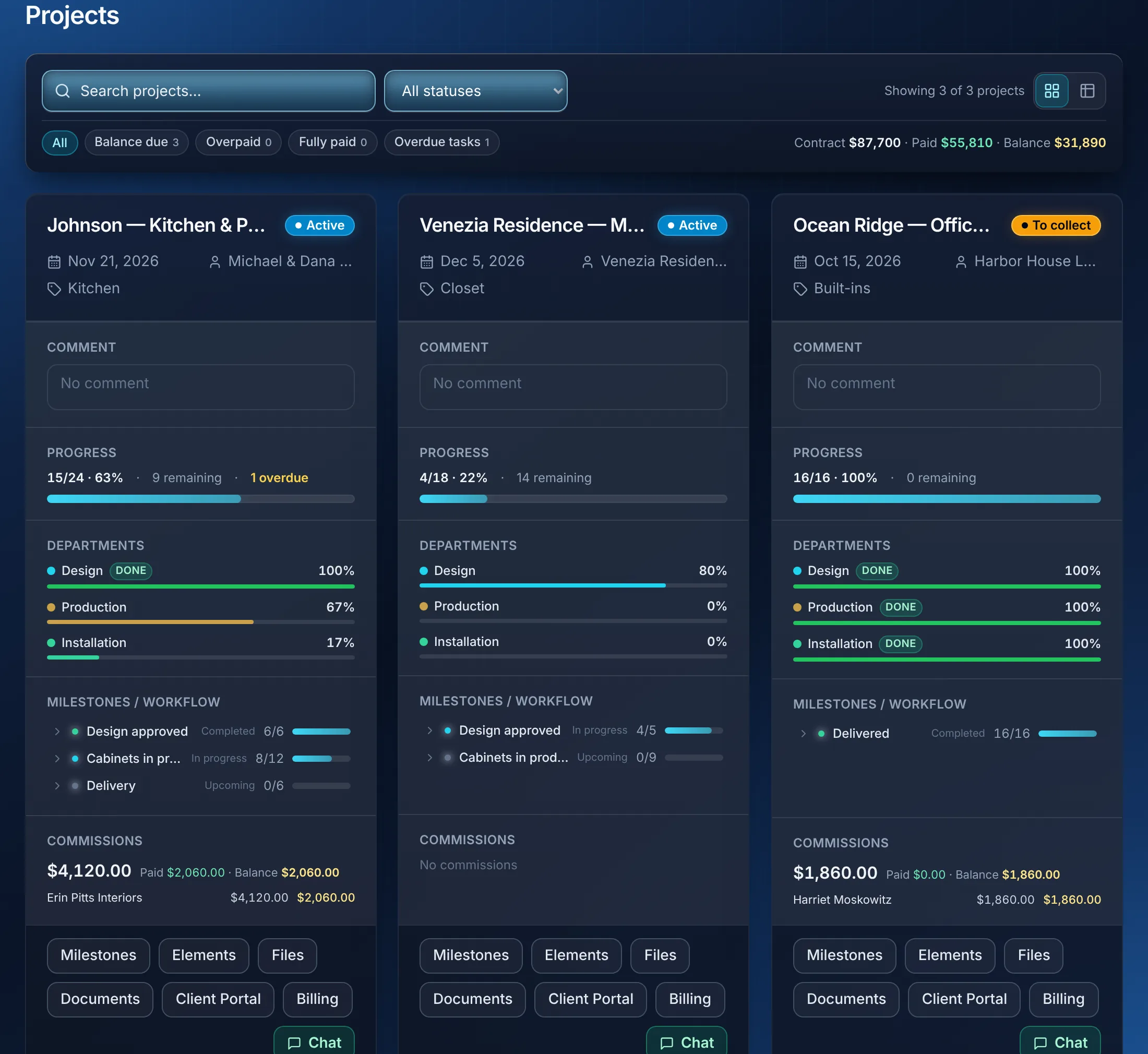
Projects

Every job on one board

Design, Production, Installation — who does what, what is done, what is overdue. Workers see only their tasks; you see the whole shop.

  • Milestones with progress per department
  • Contract, invoiced, paid and balance on the card
  • Designer commissions tracked per job
Projects: three job cards with department progress, milestones, money and commissions.

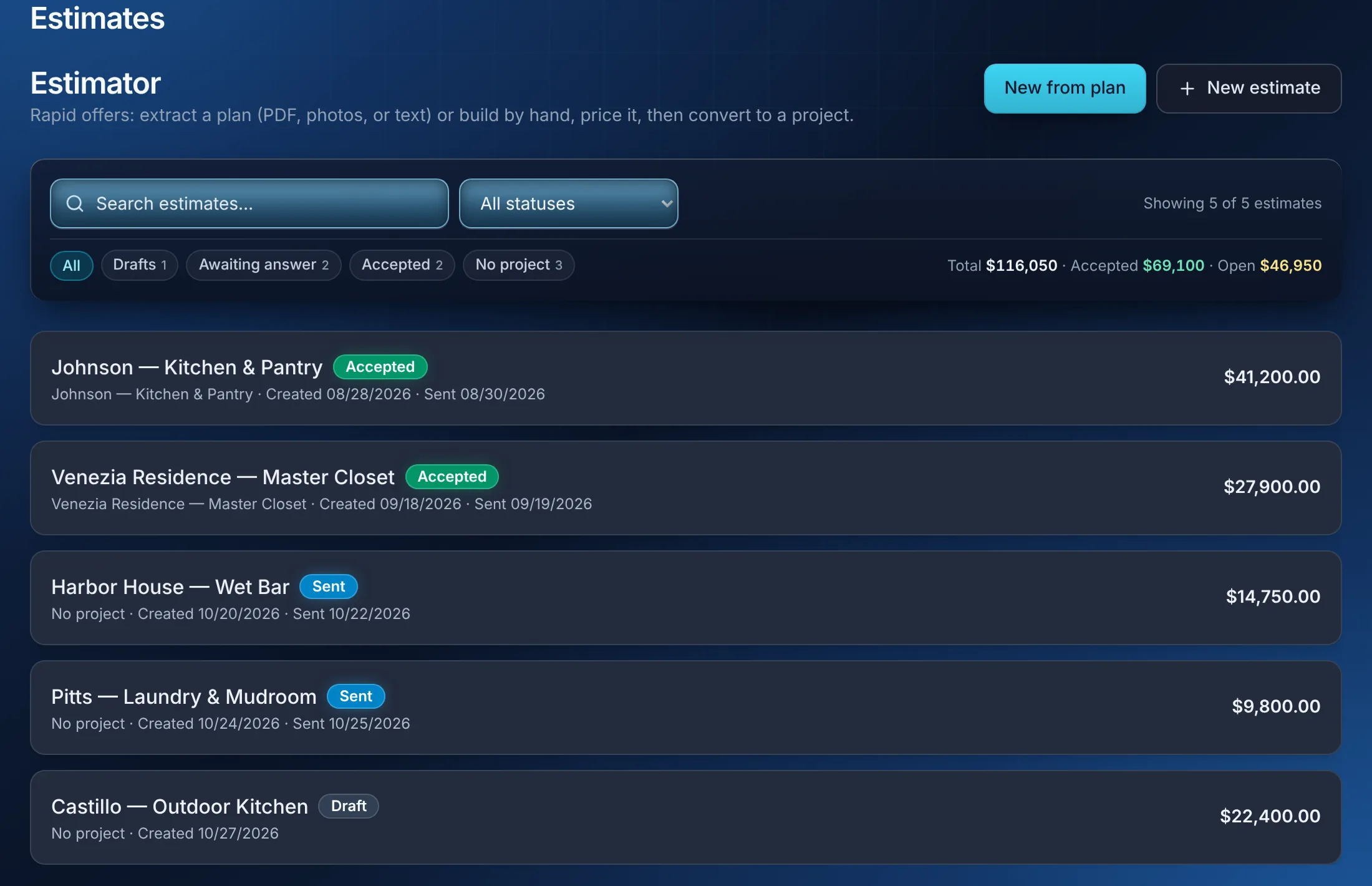
Estimates

Price it once, from your own price list

Build the estimate from components and price lists, or extract it from a plan with AI. Accept it and it becomes the project, the contract and the billing schedule.

  • New from plan: a PDF, photos or text
  • Open, accepted and total at a glance
  • Convert to a project in one step
Estimates: a list of offers with status, totals and the New from plan button.

Contracts and signatures

Contracts signed on a phone, from your templates

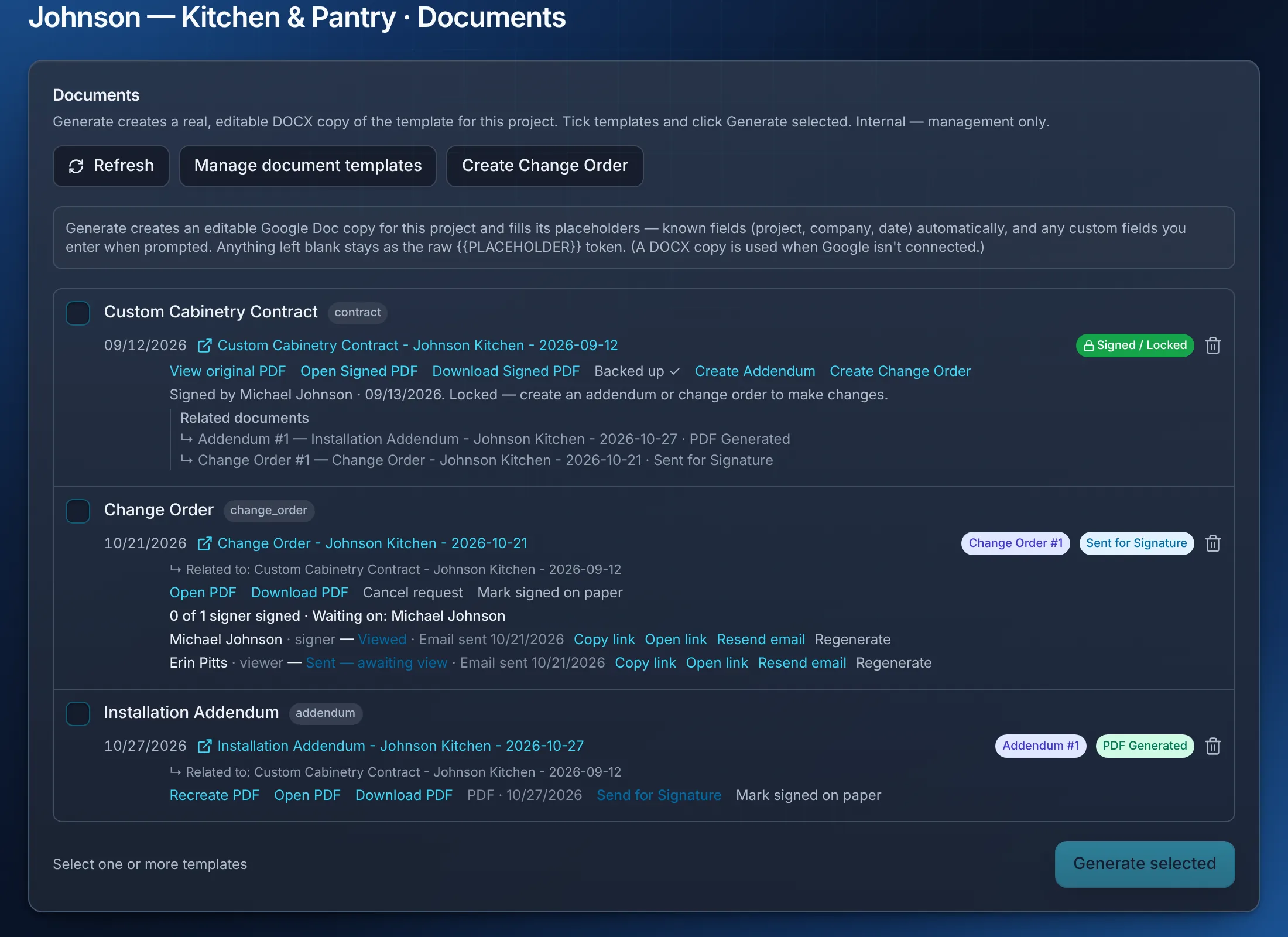
Generate contracts, change orders and addenda from your Google Docs templates. Send from your Gmail; get a signed PDF with an audit trail. Changes link back to the original.

  • Signed / Locked — changes need a change order
  • Every recipient's status: sent, viewed, signed
  • Signed PDFs backed up inside the app
Documents: a signed contract, a change order waiting for a signature with each recipient's status, and an addendum with its PDF.

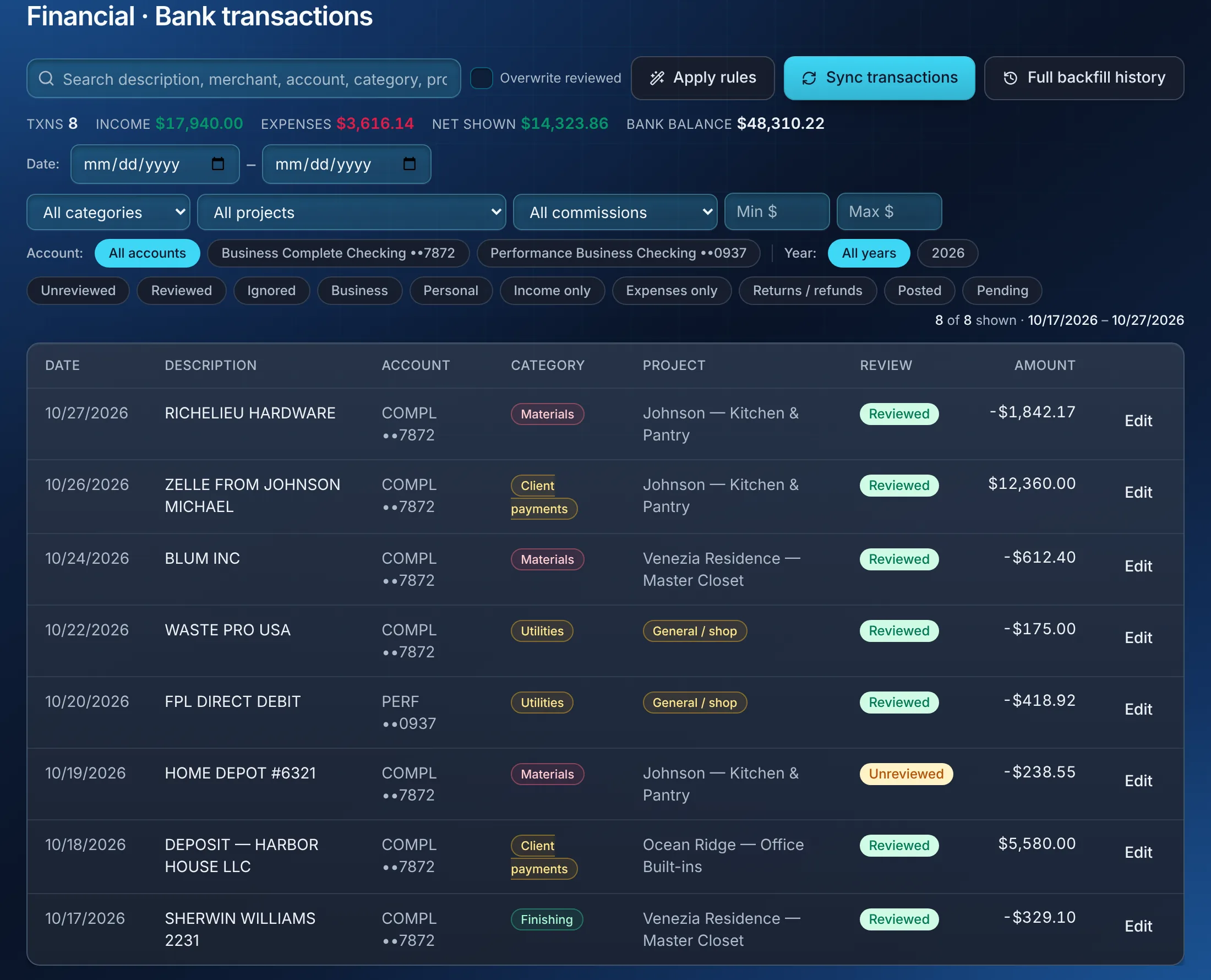
Bank feeds and bookkeeping

Bookkeeping that happens while you build

Bank accounts sync on their own; rules categorize each line and tie it to the job. Income, expenses and net for any period, by account, in seconds.

  • Apply rules to thousands of lines at once
  • Unreviewed lines flagged for a five-minute pass
  • Split one payment across jobs
Bank transactions: synced lines with category, project and review status, filters by account and year.

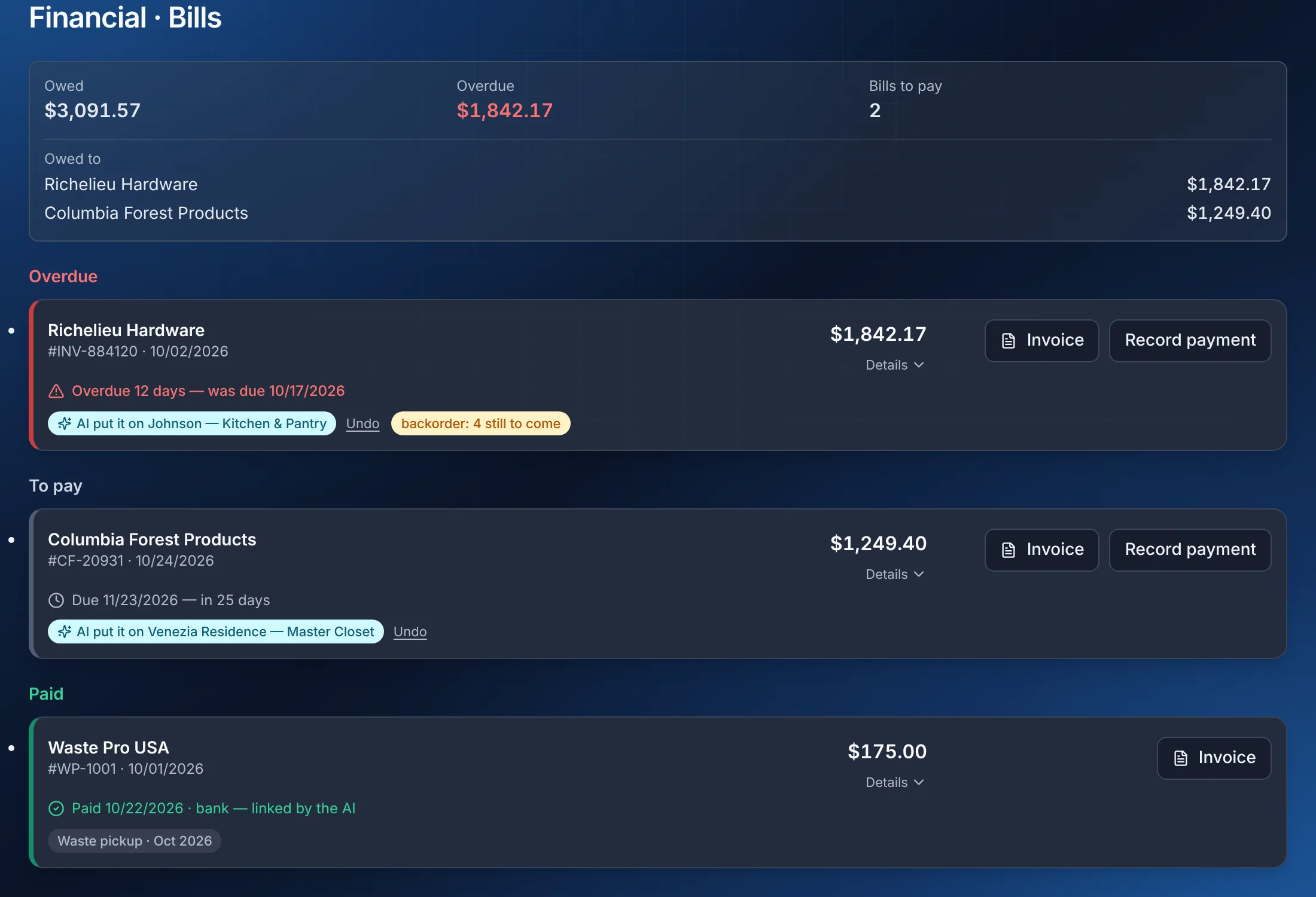
Supplier bills

Supplier invoices read by AI

Invoices arrive in your Gmail. The app reads them — supplier, total, tax, job, backorders — and matches each to the bank payment that paid it.

  • Overdue, to pay, paid — in that order
  • Backorders tracked line by line
  • Sales tax taken from the invoice itself
Bills: what is owed and to whom, an overdue bill the AI put on its project, one to pay, one paid and linked by the AI.

Sales tax and deadlines

Sales tax and deadlines without the spreadsheet

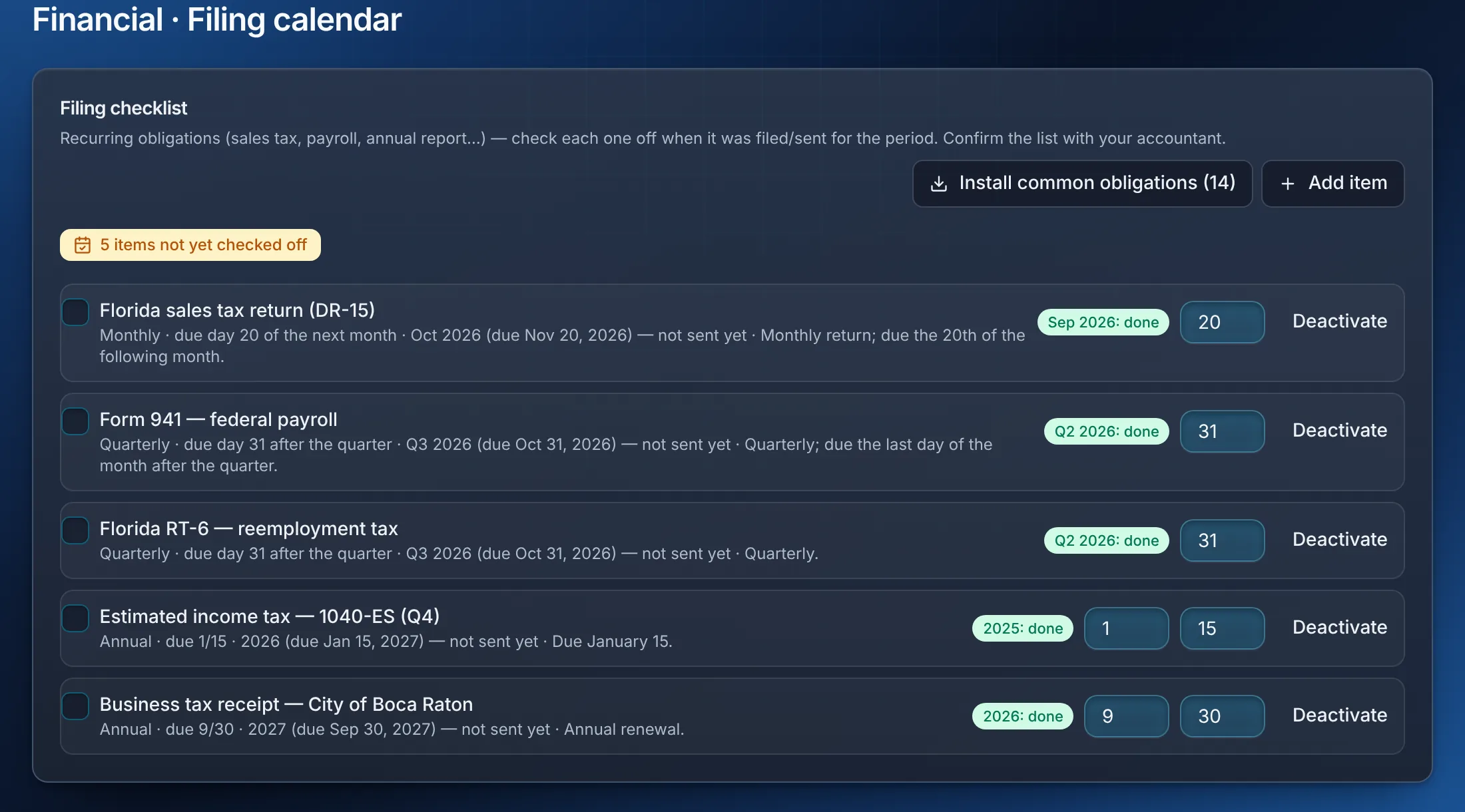
Florida DR-15 prep counts the tax you already paid your vendors. A filing calendar keeps the 941, RT-6, estimated taxes and licenses on schedule, with reminders.

  • Each deadline ticks its own period
  • Reminders before the due date
  • Tax documents and W-9s in one place
Filing calendar: sales tax, payroll, reemployment tax, estimated taxes and the business tax receipt with their due dates.

Sample data.

Dashboard

Where the money is, this morning

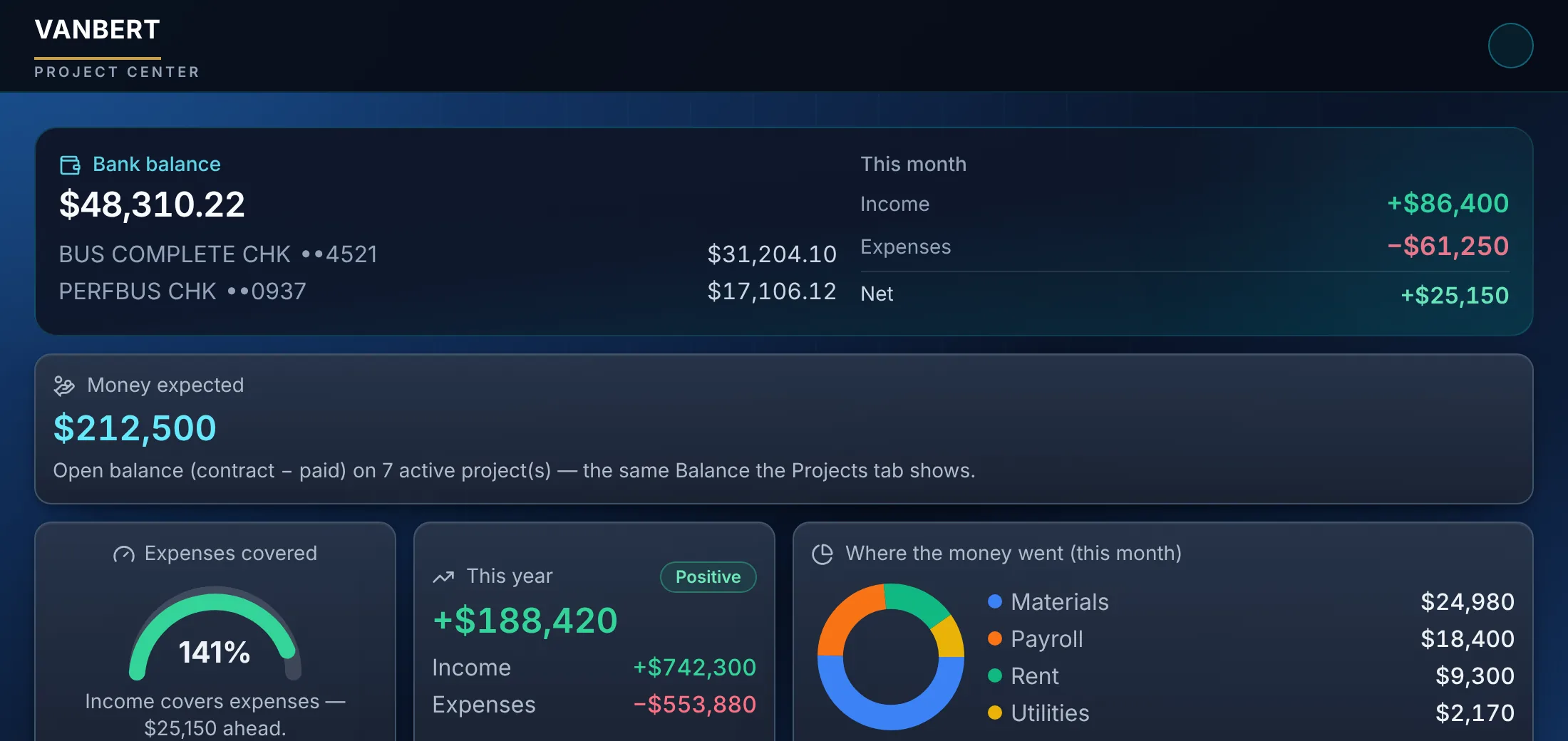
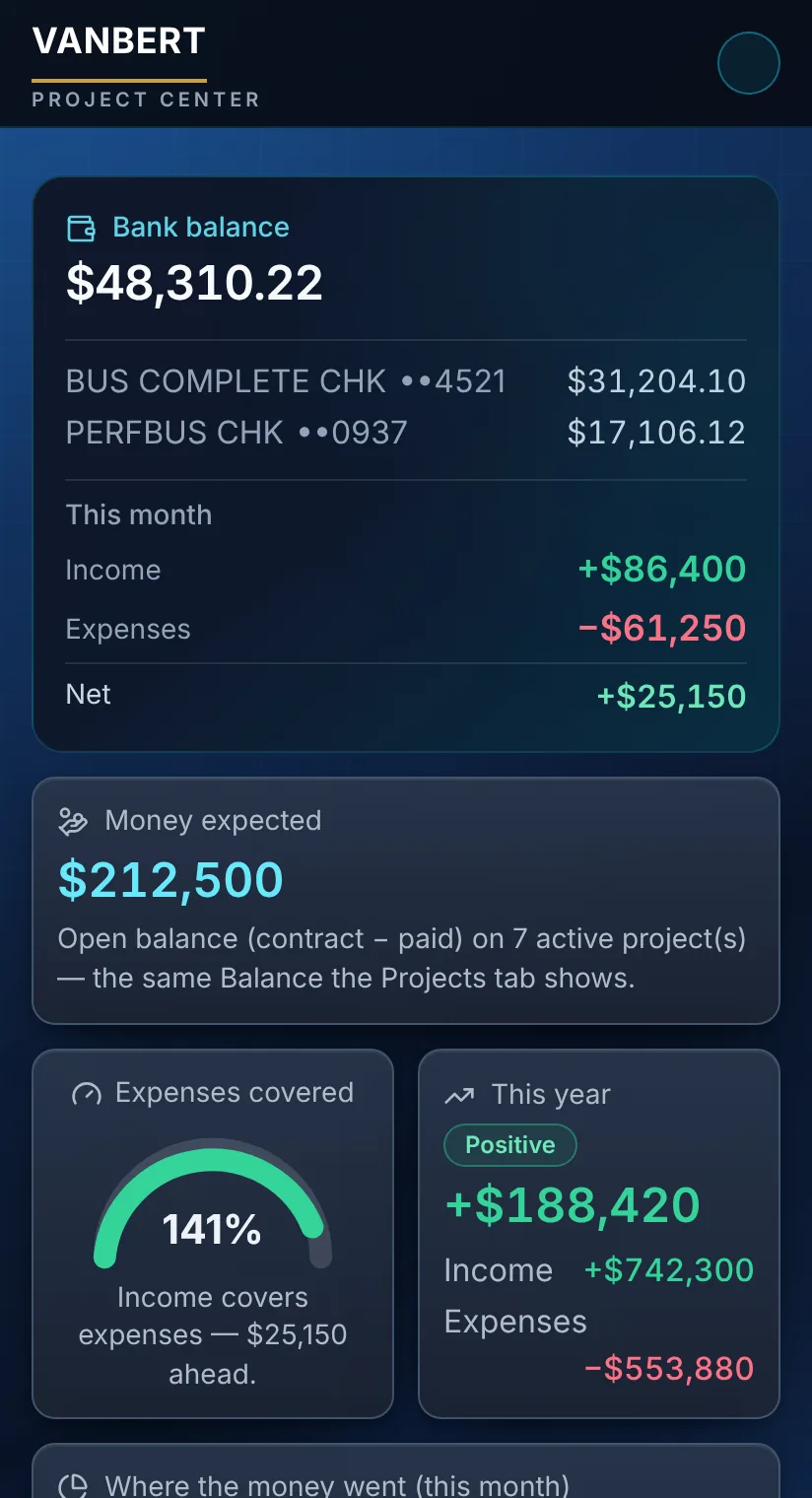
Bank balance by account, this month's income and expenses, money expected on active projects, and the year so far — on the desk and on the phone.

The Dashboard: bank balance by account, this month's income and expenses, money expected on active projects, and the year so far.
The Dashboard on a phone: bank balance by account, this month's income and expenses, money expected on active projects.

Also in the box

  • Client portal and offers

    Clients follow their project, sign documents and read what you share. Dealers get offer pages they can accept on their phone.

  • Wholesale ordering

    Dealers, designers and installers order from your catalog inside the app; suppliers list theirs. One place for the trade channel.

  • Morning digest

    Every morning, an email with what needs your attention: overdue work, approvals waiting, bank lines to review.

  • AI partner

    Ask questions about your own data — bills, bank, projects, estimates — and get an answer grounded in it, with the sources named.

Pricing

Pick what you are. A company gets the whole app; everyone else gets the part they need, at the price of that part.

  • A worker

    You get invited onto other people's jobs and do the work.

    $5 / month

    Worker · 1 person

    • Keep working on your projects
    Start
  • A designer

    You design the work and hand it to whoever builds it.

    $19 / month

    Designer · 3 people · 25 projects

    • Run your own projects
    • Buy from suppliers in the marketplace
    • Keep working on your projects
    Start
  • A supplier

    You sell materials or hardware to the people who build.

    $39 / month

    Supplier · 5 people

    • Buy from suppliers in the marketplace
    • Sell in the marketplace
    • Keep working on your projects
    Start
  • A contractor on my own

    You run your own jobs and bring other people onto them.

    $49 / month

    Contractor · 5 people · 25 projects

    • Run your own projects
    • Bring other companies onto your jobs
    • Buy from suppliers in the marketplace
    • Keep working on your projects
    Start
  • A homeowner

    You are having something built and want to follow it.

    $100 / month

    Homeowner · 1 person · 3 projects

    • Run your own projects
    • Bring other companies onto your jobs
    • Keep working on your projects
    • Keep the finished job — who built it, and what was signed
    Start
  • A company

    You run jobs, have a team, and may sell to other companies.

    $149 / month

    Pro · 50 people · 200 projects · 30 days free first

    • Run your own projects
    • Bring other companies onto your jobs
    • Buy from suppliers in the marketplace
    • Sell in the marketplace
    • Keep working on your projects
    Start 30 days free

Prices in USD, per month, cancel any time. Questions, or a shop with more people than a plan allows? sales@vanbert.com.

Your data

  • Companies are isolated from each other in the database (row-level security), and that isolation is tested automatically.
  • Daily encrypted backups of the database and files, with the restore path exercised.
  • Google is connected per company, with the narrowest scopes: the files the app creates, sending email, and read-only mail access used only to import supplier invoices. Bank data comes through Plaid, read-only.
  • Cards are handled by Stripe. We never see or store them.

Built in a shop

Vanbert Cabinetry builds custom cabinets in South Florida — showroom in Boca Raton, CNC factory in Delray Beach. The bank, the bills, the contracts and the signatures of that shop run through this app every day. What you get is what the shop uses.

Questions

Is my data separate from other companies?

Yes. Every company is isolated in the database with row-level security, and that isolation is covered by an automated test suite that runs on every change.

Do I need Google or a bank connection?

No. Projects, estimates and invoices work on their own. Connect Google when you want contracts from your own templates and email from your Gmail; connect your bank when you want bookkeeping and bills matched automatically.

What about backups?

The database and your files are exported daily, encrypted, and the restore path is exercised — not just assumed.

Can I cancel?

Any time, from your account. Your records stay readable; nothing is deleted the day you stop.

Who is behind this?

Vanbert Cabinetry — a custom cabinet shop with a showroom in Boca Raton and a CNC factory in Delray Beach, Florida. The app runs the shop every day.

Run the shop from one place.

Create the account, connect what you use, and start with the next job.

Start free
Start free